BLOG
Operating Instructions for the Zizi Project App
28/03/2025
Dear ZZP KOC Community,
ZZP is delighted that our application is receiving increasing support from KOCs. However, the ZZP team has noticed that many KOCs are still unfamiliar with how to use the application. Therefore, we have prepared this blog post to provide detailed step-by-step instructions on how to use the ZZP application, helping you achieve the highest efficiency in your collaboration!
1. Account Setup on the ZZP App
To make a good impression on brands and help them easily view your channel metrics (increasing your chances of sample approval), KOCs need to perform some basic setups on the ZZP application. Don't worry, these setups only need to be done once during your entire collaboration with us.
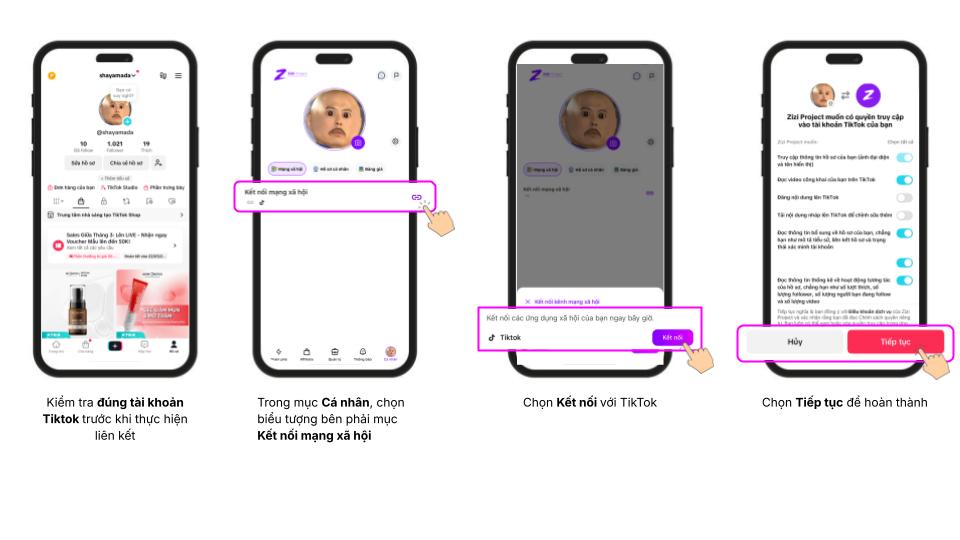
a. Link TikTok Channel
Linking your TikTok channel with ZZP is mandatory. This allows brands to view important channel metrics such as follower count, engagement rate, number of likes, etc., thereby assessing your collaboration potential.
Detailed instructions:
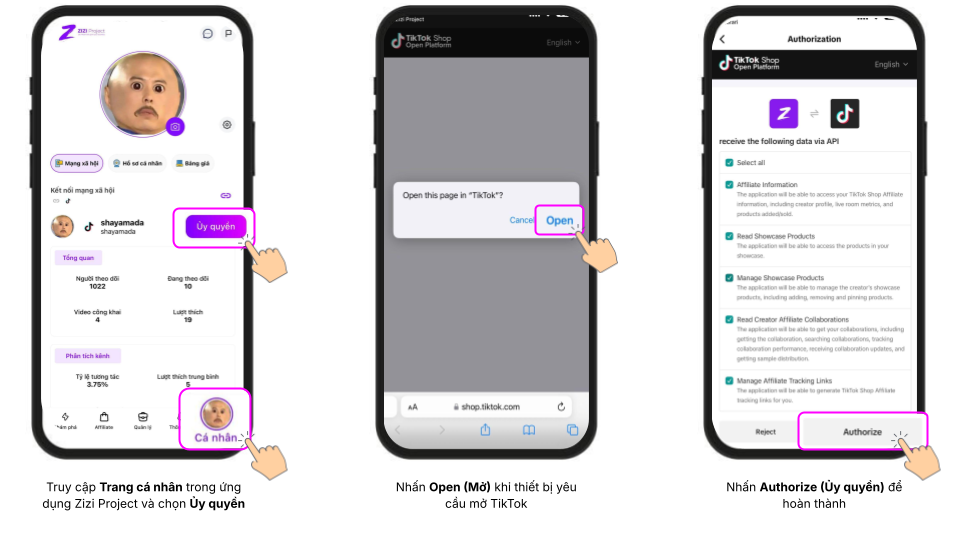
b. Authorize Showcase
Authorizing Showcase allows ZZP to automatically check and attach product links you have registered on the application. This helps minimize the risk of unregistration due to not attaching product links to the Showcase.
View detailed authorization instructions here: Instruction Link
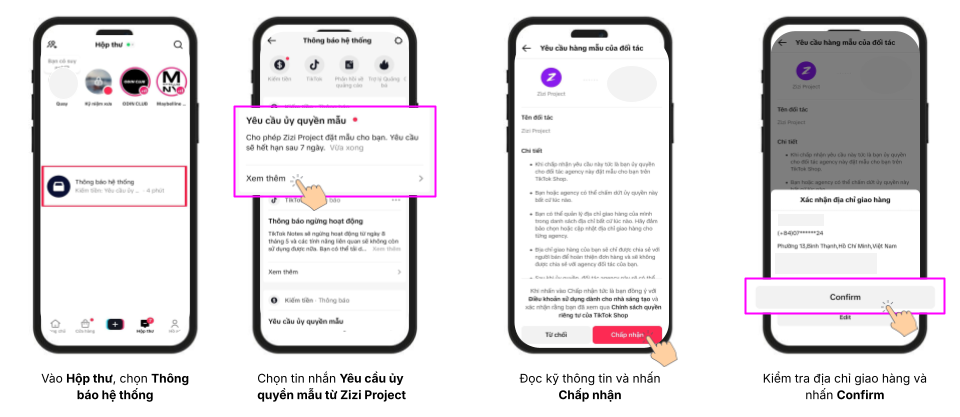
c. Authorize Sample Receipt
ZZP (and other TAPs) require KOCs to authorize sample orders (if approved by the brand). This means ZZP will create a 0-cost order from the brand on your behalf, speeding up the sample receipt process.
Detailed instructions:
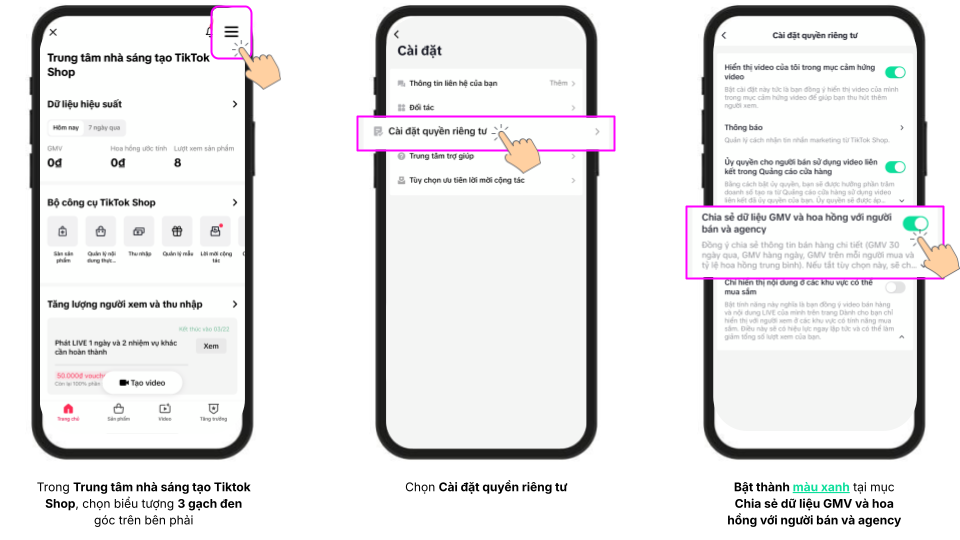
d. Enable GMV Viewing Permissions
Enabling GMV viewing permissions is a crucial step for brands to evaluate your channel's effectiveness, including sales and revenue from videos/livestreams in the last 30 days. This is one of the reference metrics for brands to decide whether to approve you for samples.
Note: High GMV does not 100% guarantee approval, but it significantly increases your chances!
Detailed operation instructions: Instruction Link
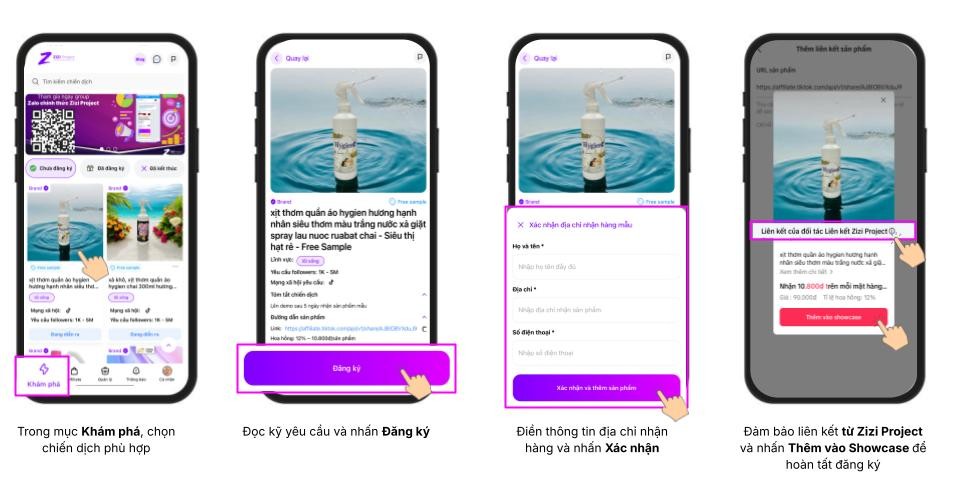
2. Register to Receive Sample Products
3. Track Orders
-
For orders sent via TikTok:
Check under your Orders section like any other regular orders.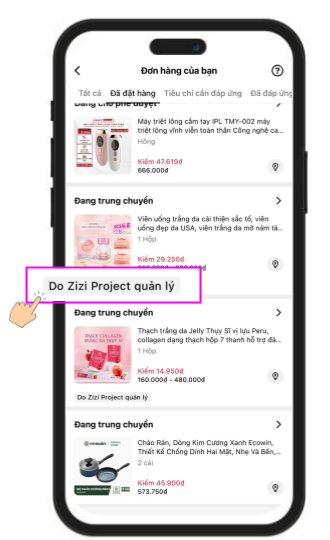
-
For off-platform orders:
Brands will send sample products to KOCs via external shipping methods, not using TikTok's system. Therefore, KOCs should pay attention to their phones to avoid missing calls from shippers! The ZZP team is working hard to soon update the feature for tracking orders with a tracking code directly on the application, making it easier for you to check delivery status.
4. Upload Draft (Demo) to the ZZP App
KOCs need to upload drafts to the application for brand approval before posting them on their personal TikTok channels.
Demo approval time: No more than 48 hours. If you haven't received a response after this time, please contact the ZZP Customer Service team via hotline +84898240657 for assistance!
Detailed instructions:
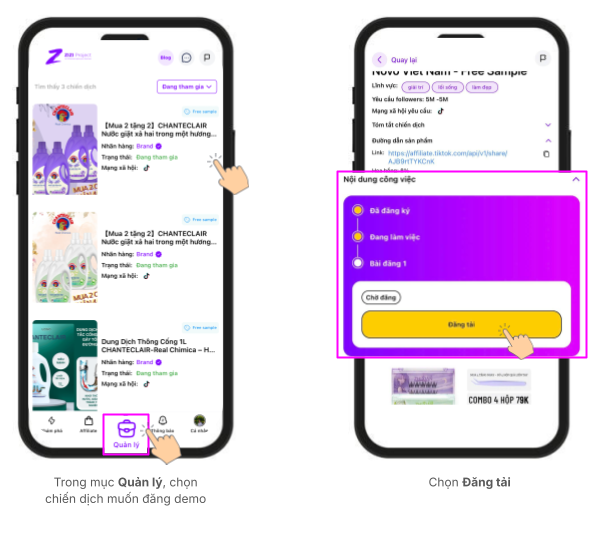
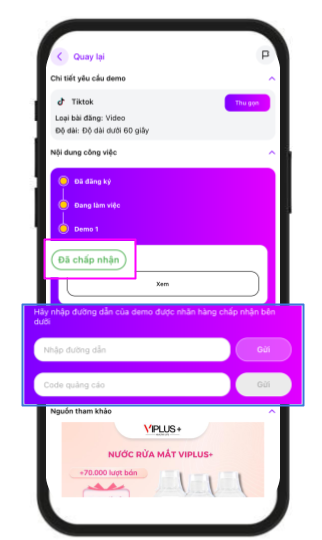
5. Complete the Campaign
After the brand approves your demo, please upload it to your personal TikTok channel registered with ZZP. Then, enter the post link and promotion code into the ZZP application.
Operation instructions:
6. ZZP Acceptance Steps
ZZP will accept KOC videos based on the following criteria:
- Ensure the post has the ZZP link attached.
- The video is posted on the correct registered TikTok channel.
Note: ZZP reserves the right to reject and request re-upload if the video does not meet the requirements.
ZZP wishes the ZZP KOC Community effective operations and an abundance of orders.
Sincerely,
The ZZP Team.